

Product Revamp
2024

AwesomeQA is an early-stage startup, that offers an AI-powered solution delivering instant responses to web3 communities across Discord, Telegram, and websites. The bot taps into FAQs, documentation, and chat logs for precise answers with verifiable references. Its web app includes a support portal for query resolution and knowledge management.
Opportunity
Our product's previous design, built on Material Design 2, was functional but lacked the modern aesthetic and flexibility needed to support evolving user workflows. Feedback indicated challenges with navigation, slower task completion rates, and frustrations, e.g. with managing the knowledge base efficiently.
Research Insights
01 Knowledge Base Management
Users struggled to identify and fix outdated or incorrect information quickly, leading to inefficiencies.
02 Navigation & Task Completion
The existing interface hindered users from completing key tasks swiftly, affecting engagement.
Main Goals
01
Transition to a modern and customizable design system to enhance the product's visual appeal and usability.
02
Introduce streamlined navigation for faster task completion.
03
Revamp the knowledge base management experience, empowering users to address outdated information and control bot learning sources effortlessly
We adopted shadcn/ui, a modern and flexible component library, to refresh the UI. The updated design offered a clean and contemporary aesthetic while improving scalability.

The process involved close collaboration with the founders and developers to align on priorities and technical feasibility.
Prototypes and iterative feedback loops ensured the new features met user expectations and business goals.
Old vs New Home Page.


A simplified layout and clearer hierarchy were implemented, all across the platform, enabling users to access core features more intuitively.
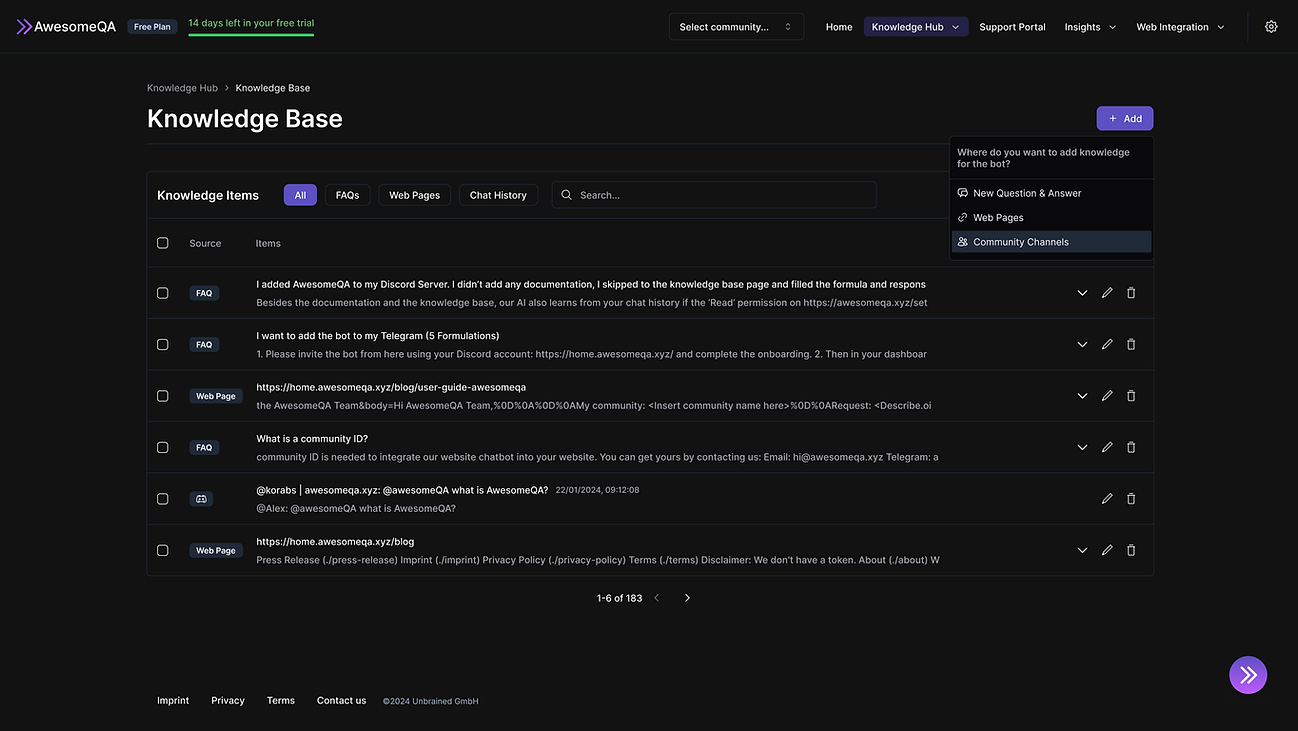
Knowledge Base
We introduced a quick-access dashboard to highlight outdated or incorrect entries and added tools for rapid source management, enabling users to efficiently oversee and update the bot's learning sources.


Support Portal
The support portal is where agents can view messages and threads that were not answered by the bot, allowing them to quickly take action on those messages. We added the ability to better filter messages and select them in bulk.

Insights
This feature enables agents to view qualitative and quantitative data for better decision-making, improving the experience of their products and community.


Web Integration
In addition to the improvements in the interface, new features were also added based on user feedback and after running a prioritization workshop with my team using a Effort x Impact matrix.
New features:
01. The ability for both the end-user and support agent to send attachments.
02. Automatic translation of received messages.
03. The ability for support agents to use macro responses.
04. The ability to copy tickets for quick sharing within the team.


Settings
Where admins can configure bot permissions, set disclaimers in the bot's responses, enable or disable direct messages, and manage translation languages.


Impact
User Engagement
Enhanced navigation led to increased interaction with advanced features.
Efficiency Gains
Task completion times decreased as users navigated the product more seamlessly.
Knowledge Base Management
Users reported a dramatic reduction in time spent identifying and correcting outdated information, improving trust in the bot's outputs.