

AI-Led Escalation Copilot
2024-2025

Formerly AwesomeQA, Pluno is an AI-powered customer support platform that helps teams automate routine inquiries, streamline ticket resolution, and collaborate more efficiently. It combines AI and human support to improve customer experience and team productivity.
Problem
In earlier research, we discovered that escalation workflows were often slow and fragmented. Missing context between support, technical teams, and other stakeholders led to constant back-and-forth, while manual updates across tools caused delays and reduced visibility.
Research
As a first step, I started doing cold outreach and conducting meetings to gather insights that would help me to understand better the spectrum and pain points of these support teams.

Once my team and I had a better understanding of the needs of the support teams, based on their feedback, we were able to define what would be essential to launch.
Solution
We defined an initial flow where end users could reach out through the web widget or email.
When the AI assistant couldn’t resolve an issue, the ticket was escalated to the right team through the company’s internal chat, either to a specific channel or a unified inbox for the support team to triage and resolve
~70%
of the companies we interviewed used Slack as their internal chat tool, which made it the first platform we integrated.
Product & Design Objectives
01 AI Workflows
Ability to create workflows in a simplified way using natural language, as well as automatic ticket assignment.
02 User & permission management
A basic feature to manage team members.
03 Performance tracking & insights
Intuitive visualization to quickly understand things like the performance of the AI agent and team members.
04 Slack <> Pluno
Integration with Slack to streamline the ticket escalation process.
Process
Gathering insights & team alignment
01 Kept conducting user interviews to enrich our insights database and earn validation.
02 Organized feature-based alignment sessions with the team to discuss technical feasibility and UX strategy.
03 Created rapid hand-drawn prototypes with the team and initial flowcharts to align on design and functionality.


Exploring the escalation flow.

Process & Deliverables
Internal testing & iteration
01 Designed and implemented the AI workflow setup and auto-assignment settings in our web app.
02 Designed and set up test environments using Slack’s Block Kit framework.
03 Simulated ticket creation via Pluno's web widget and email to evaluate workflows and auto-assignment logic.
Workflows and Auto-assignment features.


Test environment on Slack.


With these internal tests, we identified and addressed technical and UX friction points before releasing it, such as incorrect ticket routing and misunderstanding of some flows.
Process & Deliverables
Customer pilot testing
01 Invited selected customers and potential leads to try out using dedicated playground environments.
02 Customer feedback helped refine the Slack experience, improving clarity in workflows and notifications. mostly for the tecnical side, so there were several rounds of AI iterations

While the experiments were running, I also built the reporting and the member management pages.


Zendesk integration
While our initial goal was to deliver the full support experience within Pluno's platform + Companies' internal chat tools, continuous discovery revealed a key trade-off.
Many leads preferred staying within their existing tools, so we shifted strategy and prioritized integrations.
65%
of teams I spoke with were Zendesk users.
It became our first native integration to streamline escalations and drive adoption.
Process & Deliverables
01 Studied Stylo Assist + ChatGPT as a key reference for style and workflow.

02 Quickly prototyped the proposal and iterated after a few rounds of feedback with my team.
Critiques for tech and design aligments.


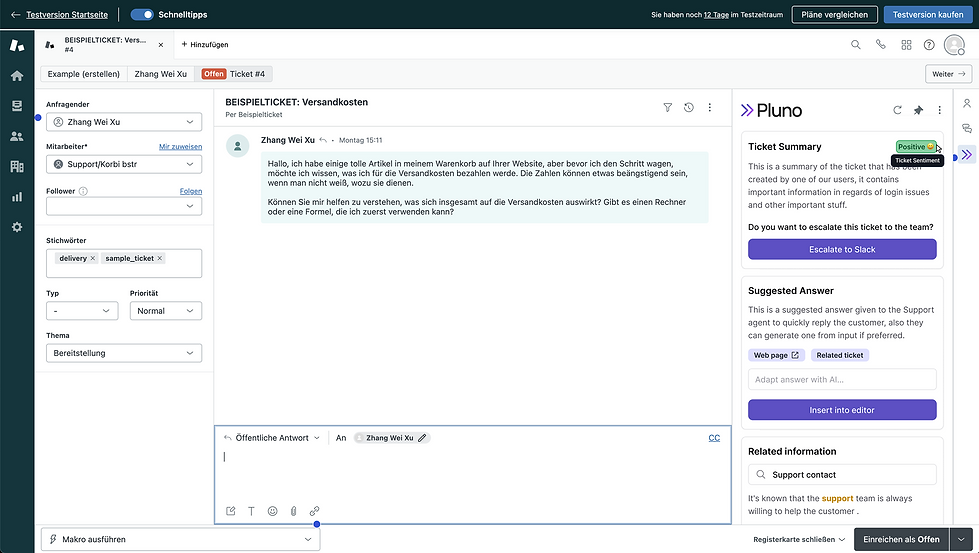
App in Zendesk.


Jira integration
As the Zendesk integration gained traction, users began requesting support for Jira as well. Since many technical teams relied on it for issue tracking, I quickly tackled the request and, together with my team, we shipped a Jira integration to bridge support and engineering workflows.
With Jira integrated into Pluno, support agents can not only escalate tickets but also stay in Zendesk to check if tickets are linked to Jira issues, connect related cases, and add comments or images, all without leaving their workspace.


Results & Impact
3 months after launch.
Zendesk and Jira Integrations
32
app installs.
22%
of all escalations are now initiated directly through Pluno.
800+
escalations created via Pluno.
6-8
minutes saved per escalation vs previous workflows.
533
unique support agents actively using the app.
Workflows feature
3,129
workflows created since launch.
1,055
workflows per customer on average.